

Ross Downing GMC of Gonzales

Blog / Gonzales GMC Dealer

Used GMC Truck Lineup: A Comprehensive Guide to Reliable and Affordable Options

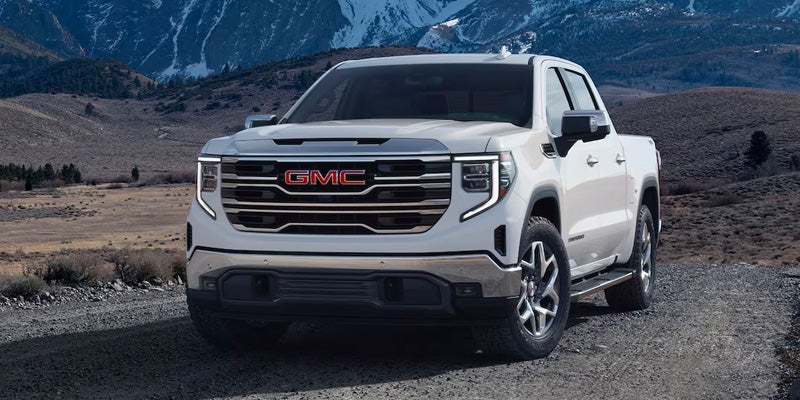
A white GMC pickup truck is parked on a gravel road with mountains in the background.

When it comes to finding a dependable and budget-friendly pickup, used GMC trucks offer a compelling blend of quality, performance, and value. This guide will explore the various options available in the used GMC truck market, with a focus on reliability, affordability, and the advantages of purchasing through reputable dealerships like Gerry Lane.

Budget-Friendly Options Under $20,000

For those seeking a capable truck without breaking the bank, several used GMC models can be found for under $20,000. These budget-friendly options often include:

  1. GMC Sierra 1500 (older models)
  2. GMC Canyon (midsize truck)
  3. GMC Sonoma (compact truck, discontinued but still available used)

When considering these more affordable options, it’s crucial to balance the initial purchase price with potential maintenance costs. Older models or those with higher mileage may require more frequent repairs, so factor this into your budget calculations.

Dealership vs. For Sale by Owner

While private sellers may offer lower prices, purchasing a used GMC truck through a dealership like Gerry Lane provides several advantages:

  1. Reliability: Dealerships often perform thorough inspections and necessary repairs before listing a vehicle for sale.
  2. Warranties: Many dealerships offer extended warranties or certified pre-owned programs for added peace of mind.
  3. Financing Options: Dealerships typically have relationships with multiple lenders, potentially offering better financing terms.
  4. Trade-In Value: If you have a vehicle to trade in, dealerships can often provide more competitive offers.

For those wondering about the best way to get a deal on a used truck, dealerships frequently run special promotions or seasonal sales events that can lead to significant savings. Additionally, dealerships may be more willing to negotiate on price or throw in extra perks like free maintenance for a limited time.

Used Truck Reliability and Maintenance

GMC trucks are known for their durability and longevity, but proper maintenance is key to ensuring your used truck remains reliable for years to come. When evaluating a used GMC truck, consider the following:

  1. Maintenance History: A well-documented service history is a good indicator of a truck that has been properly cared for.
  2. Future Preventative Maintenance: Factor in the cost of regular oil changes, tire rotations, and other routine services.
  3. Common Issues: Research known problems for specific models and years to anticipate potential repairs.

For those less familiar with vehicle mechanics, here are some key areas to inspect when looking at a used GMC truck:

  • Check for rust, especially underneath the vehicle
  • Examine the tires for uneven wear, which could indicate alignment issues
  • Look for signs of leaks under the truck
  • Test all electronic features, including the infotainment system and power windows
  • Pay attention to any unusual noises during the test drive

Remember, a thorough inspection by a qualified mechanic can reveal potential issues that may not be immediately apparent.

GMC Certified Pre-Owned Program

For those seeking additional assurance when purchasing a used GMC truck, the Certified Pre-Owned (CPO) program offers numerous benefits. To be eligible for the GMC CPO program, vehicles must meet specific criteria:

  • Be within 6 model years old
  • Have fewer than 75,000 miles on the odometer
  • Pass a comprehensive 172-point inspection
  • Have a clean title

CPO GMC trucks come with several advantages:

  1. Extended Warranty: CPO vehicles typically include a 6-year/100,000-mile powertrain limited warranty and a 12-month/12,000-mile bumper-to-bumper limited warranty.
  2. 24/7 Roadside Assistance: Peace of mind knowing help is always available if needed.
  3. Free Vehicle History Report: Transparency about the truck’s past.
  4. Trial Subscriptions: Many CPO vehicles come with complimentary trials of OnStar and SiriusXM satellite radio.

The CPO warranty coverage begins from the original in-service date of the vehicle, not the date of the CPO purchase. This means that if you’re considering a CPO GMC truck that’s already a few years old, it’s important to check how much warranty coverage remains.

Popular Used GMC Truck Models

When it comes to choosing the best used GMC truck, several models stand out for their reliability and performance:

  1. GMC Sierra 1500: A full-size pickup known for its robust construction and powerful engine options.
  2. GMC Canyon: A midsize truck that offers a good balance of capability and fuel efficiency.
  3. GMC Sierra HD (2500/3500): Heavy-duty options for those needing maximum towing and payload capacity.

Each of these models has its strengths, and the best choice depends on your specific needs and budget. The Sierra 1500, for instance, is often praised for its comfortable ride and impressive towing capabilities, making it a versatile choice for both work and family use.

Tips for Buying a Used GMC Truck

To ensure you get the best deal and the right truck for your needs, consider these recommendations:

  1. Visit Dealerships: Start your search at reputable dealerships like Gerry Lane, where you can find a wide selection of used GMC trucks.
  2. Check Online Resources: Use online platforms to research prices and compare different models and years.
  3. Carefully Inspect Vehicles: Take your time examining any truck you’re interested in, paying close attention to both cosmetic and mechanical condition.
  4. Review Vehicle History: Always request and review the vehicle history report to check for accidents, flood damage, or other issues.
  5. Test Drive: Take the truck for a thorough test drive, paying attention to how it handles, accelerates, and brakes.
  6. Consider CPO Options: If available, certified pre-owned GMC trucks offer additional peace of mind with extended warranties and thorough inspections.

By following these steps and leveraging the expertise of dealership staff, you can find a reliable used GMC truck that fits your needs and budget. Remember, the goal is to find a vehicle that not only meets your current requirements but will also serve you well for years to come.

Whether you’re in the market for a rugged work truck, a comfortable family hauler, or something in between, the used GMC truck lineup offers a range of options to suit various needs and preferences. With careful research, thorough inspection, and the support of a reputable dealership, you can drive home in a dependable used GMC truck that offers both quality and value.
Posted in:

Related Posts

GMC Sierra vs Silverado Comparison for Truck Shoppers

GMC Sierra vs Silverado Comparison for Truck Shoppers

GMC Sierra vs Silverado comparisons start with two trucks that share major GM engineering. However, their trims and equipment take different paths. Both offer strong engine choices, useful trailering hardware, and a wide range of cab and bed setups. However, the details change as you move through each lineup. Therefore, the clearest way to compare them is to look at shared hardware first. Then, compare trims, cabin materials, off road equipment, and cargo features. Start With What the Sierra and Silverado Share The Sierra 1500 and Silverado 1500 share core GM truck engineering. That includes overlapping engine choices and related transmission pairings. So, are they the same truck? No. They start from a similar mechanical base, but each brand packages that hardware differently. In addition, both lineups can offer turbocharged gasoline, V8 gasoline, and Duramax diesel power. Both trucks can be configured for towing, work, commuting, and long highway trips. Moreover, their cab and bed choices overlap in several areas. Before comparing trim names, it helps to confirm the shared pieces: Both trucks can offer a 2.7 liter turbocharged gasoline engine, V8 choices, and a 3.0 liter Duramax diesel. Both lineups include rear wheel drive and four wheel drive configurations across multiple trims. Both trucks offer trailering technology, camera views, and bed focused equipment on selected trims. Still, the trims do not line up perfectly. Therefore, two trucks with the same engine can feel very different inside. Equipment packages, materials, suspension hardware, and exterior details can change the final result. Trim Structure Creates the First Major Difference By contrast, GMC and Chevrolet use different trim ladders. That matters because trim names can make direct comparisons confusing. For this reason, a Sierra Elevation does not have a perfect Silverado twin. Likewise, upper trims can overlap in price while taking different styling and equipment paths. GMC moves from Pro through SLE, Elevation, SLT, AT4, AT4X, Denali, and Denali Ultimate. Chevrolet uses names such as WT, Custom, LT, RST, LTZ, Trail Boss, ZR2, and High Country. What should you compare first? Start with the job you want the truck to handle. Then, compare equipment inside that use case. For GMC shoppers, these trim directions are useful: Pro and SLE focus on straightforward truck equipment with increasing comfort and convenience. Elevation adds a distinct street oriented look with more standard interior and technology content. AT4 and AT4X move toward off road hardware, while Denali trims focus on materials, comfort, and technology. Chevrolet follows a different structure. Therefore, the strongest comparison is not trim name against trim name. It is equipment package against equipment package. Denali and High Country Take Different Approaches Meanwhile, Denali and High Country sit near the top of their lineups. Both add richer cabin materials and more standard features. However, GMC pushes the Denali identity through its own interior finishes, seat configurations, and exterior details. Is Denali simply a different looking High Country? No. The two trims share some GM technology, but their cabin treatments and standard content differ. Sierra Denali uses its own leather treatments and trim details. Denali Ultimate moves further with upgraded front seating and massage functions. In addition, High Country delivers an upscale cabin. However, Chevrolet uses its own materials, trim patterns, and feature packaging. Super Cruise can also appear on selected versions of both trucks. Therefore, it should not be treated as a GMC only feature. The better comparison is to ask what matters inside the cabin. Seat adjustment range, material feel, display layout, audio equipment, and driver assistance features can all shape the final choice. AT4 and AT4X Change the Off Road Comparison Instead, GMC uses AT4 and AT4X to create a distinct off road path within the Sierra lineup. These trims add mechanical hardware that changes how the truck handles rough ground. What does AT4 change beyond appearance? It adds equipment tied directly to trail use. That includes a factory lift, off road tuned shocks, skid plates, and a two speed transfer case. These parts change ground clearance and traction support before cosmetic details enter the decision. Beyond that, AT4X goes further. It adds front and rear electronic locking differentials and Multimatic DSSV dampers. Therefore, it is built around more demanding terrain than a standard street focused trim. Chevrolet follows a parallel path with Trail Boss and ZR2 trims. However, the hardware mix and trim structure are not identical. For that reason, compare suspension parts, locking hardware, tires, and underbody protection before comparing badges. Choose Based on Equipment Instead of the Badge The Sierra and Silverado share enough hardware that brand alone should not decide the truck. Instead, compare the equipment that shapes how you plan to use it. Therefore, start with engine choice and towing needs. Then, compare cabin materials, off road hardware, cargo tools, and technology. In addition, review which features are standard and which require packages. Before choosing, compare these areas: Engine and drivetrain choices that match your towing, commuting, or work needs. Cabin materials, seating, displays, and driver assistance features on the trims you are considering. Cargo features, tailgate design, bed materials, suspension hardware, and off road equipment. In addition, GMC offers Sierra specific options such as the available CarbonPro bed. Chevrolet offers its own related cargo and tailgate features. Therefore, small equipment differences can matter more than the badge on the grille. With that in mind, build a side by side comparison around matching configurations. Use the same engine class, similar cab and bed setups, and similar trim goals. Then, compare price and included equipment. That process gives you a cleaner view of what each truck offers for your needs. Explore current GMC inventory at Ross Downing GMC of Gonzales to compare available Sierra configurations and equipment.

How Long Does It Take to Charge an Electric Car at Home

How Long Does It Take to Charge an Electric Car at Home

How long does it take to charge an electric car at home in Gonzales? Charging time comes from two numbers: battery energy needed and available home charging power. Therefore, one universal hour estimate cannot describe every charging session. In addition, a short commute may need only a modest refill. A long trip may require many more kilowatt hours before morning. Home Charging Time Starts With Charging Level Home AC charging uses either a 120 volt Level 1 source or a 240 volt Level 2 source. Level 1 sends power slowly through a standard household outlet. By contrast, Level 2 uses a higher voltage and can deliver far more power. Charging power is measured in kilowatts. Battery energy is measured in kilowatt hours. Therefore, a charger rated at more kilowatts can add energy faster when the GMC EV can accept that rate. Moreover, the EV also sets an AC charging limit. For this reason, a wall charger cannot force more power into the battery than the onboard charger accepts. The final rate follows the lower supported number between the charging equipment and the EV. That detail matters for GMC models with large battery packs. A HUMMER EV or Sierra EV can need substantial energy after a long trip. However, the same model may need only a small refill after local errands. How Long Does Level 1 Charging Take at Home? Level 1 charging uses 120 volt AC power and delivers relatively low charging power. GMC's Dual Level Charge Cord can use a standard outlet at up to 1.4 kW. Therefore, at that rate, charging happens gradually across many hours. The EPA estimates Level 1 can add roughly three to five miles of range each hour. Therefore, twelve hours plugged in may replace about 36 to 60 miles under favorable circumstances. That estimate works best as a planning range, not a promise. Battery temperature, outlet quality, charging settings, and energy losses can change what reaches the battery. Still, Level 1 can cover short daily mileage when the EV remains plugged in overnight. Consider a Gonzales owner who drives 25 miles between home, work, school, and errands. Level 1 may replace much of that energy before morning. However, a driver covering 80 miles each day may recover too slowly for the same routine. Level 1 also gives owners a simple entry point. No dedicated 240 volt circuit is needed when an approved household outlet is available. Even so, the outlet should be in good condition and suitable for continuous charging loads. How Much Faster Is Level 2 Charging? Level 2 charging uses 240 volt AC power and delivers far more energy each hour. GMC supports several home charging rates through compatible equipment and EV hardware. The Dual Level Charge Cord can provide up to 7.7 kW from a compatible 240 volt source. GM PowerUp 2 can provide up to 11.5 kW when properly hardwired. Some compatible GMC EV setups can support still higher AC charging rates. Therefore, Level 2 can replace a large share of daily energy during one overnight parking period. EPA guidance places many Level 2 setups near 25 to 40 miles of added range each hour. A 7.7 kW setup and an 11.5 kW setup will not refill the same battery at identical speeds. The higher power source can add more energy each hour when the EV supports it. Consequently, charger selection should start with the model's AC charging limit. The electrical circuit matters too. Higher output equipment may require hardwiring and a dedicated circuit. In addition, the home's electrical panel must have enough available capacity for the planned charging load. For many GMC EV owners, Level 2 fits overnight charging well. It can restore energy from longer commutes or repeated family trips before the next morning. Still, the correct rate should match the EV, the house, and the owner's mileage. What Changes a GMC EV Charging Estimate The charging estimate can move after you plug in because several inputs change during the session. Battery state is the first major input. A battery at 70 percent needs far less energy than one at 20 percent. Charging equipment is another input. Therefore, switching from Level 1 to Level 2 can cut the time needed for the same energy refill. The EV's onboard AC limit also caps the incoming power. Temperature can change charging speed as well. Batteries charge differently when they are very hot or cold. As a result, the EV may adjust charging power while it manages battery temperature. Charging settings also matter. A scheduled charging window can delay the start time. Likewise, a selected charge target may stop charging before the battery reaches 100 percent. The displayed finish time can change as these inputs change. However, that does not mean something is wrong. The estimate updates as the EV reads battery needs and available power. For this reason, owners should compare repeated charging patterns instead of focusing on one night. A week of normal charging gives a clearer view of how long the household routine needs. Plan a Gonzales Home Charging Setup Around Daily Miles Home charging works best when the setup matches the miles you need to replace between trips. Start by estimating how far the GMC EV travels on a normal weekday. Then note how many hours it usually remains parked at home. A short commute may need only a small nightly refill. Therefore, Level 1 may cover the schedule for some owners. Longer commutes or frequent evening trips may point toward Level 2. Next, check the GMC EV's supported AC charging rate. Then compare that number with the charging equipment under consideration. A charger with a larger rating will not exceed the EV's own AC limit. An electrician should inspect the home before higher power Level 2 equipment is installed. The inspection can cover panel capacity, circuit size, wiring, breaker requirements, and charger location. In addition, hardwired installation may support higher output than a portable cord setup. Think about where the charging cable will reach each night. The parking position, charger location, and cable path should make plugging in easy. Therefore, installation planning should include the driveway or garage layout, not only electrical ratings. The most useful charging plan is the one that restores the energy your household uses between trips. You may not need an empty to full charge every night. Instead, home charging can work like replacing the miles you used that day. For Gonzales GMC EV owners, the answer starts with daily miles, charging hours, and available home power. Level 1 can serve lighter travel schedules. Level 2 can restore energy much faster for longer routes and larger battery needs. Therefore, matching the charger to your routine can make overnight charging simple and predictable.

GMC SUV Acadia and Yukon XL for Gonzales Lifestyles

GMC SUV Acadia and Yukon XL for Gonzales Lifestyles

GMC SUV Acadia and Yukon XL choices can lead Gonzales families toward very different daily driving routines. Both provide three rows and room for up to eight with the right seating layout. However, they occupy very different amounts of road, driveway, and garage space. Therefore, your weekly schedule should guide the comparison from the start. In addition, passenger count matters alongside cargo needs, parking spaces, commute miles, and trip frequency. How Much SUV Do You Want to Drive Every Day? The GMC Acadia is a midsize three row SUV with a shorter exterior footprint. The Yukon XL is a full size three row SUV with far more overall length. That size gap changes how each one fits into a normal weekday. The Acadia measures about 204 inches long. By contrast, the Yukon XL stretches about 225 inches. Therefore, the larger GMC needs roughly 21 more inches from front to rear. That extra length supports a larger cabin and much more cargo room. Still, added length changes parking and garage planning. As a result, a shorter SUV takes less room inside crowded lots and narrow residential spaces. In addition, it can leave more clearance around garage doors, shelves, bikes, and stored equipment. Do you need eight seats or simply three rows? Both GMC models can answer that passenger question. However, row count alone does not settle the size question. The stronger match comes from how frequently you fill those seats and how much space surrounds them. Daily Driving and Parking Around Gonzales Daily driving puts exterior size into context faster than a specification sheet. School pickup, grocery runs, medical appointments, and restaurant parking all involve repeated low speed maneuvering. Therefore, overall length becomes part of every normal trip. The Acadia keeps three rows within a midsize body. That can make it easier to place between parking lines or back from tighter spaces. By contrast, the Yukon XL trades compact dimensions for a much larger interior. Camera views and parking sensors can reduce some difficulty. However, technology does not shorten the body. You still need enough room to turn, stop, and open doors around nearby vehicles. Garage dimensions deserve the same attention. Measure usable depth instead of relying on the listed garage size. Shelving, freezers, tools, and storage bins can reduce the clear area around the SUV. For this reason, a driveway check can reveal more than an exterior dimension table. Families who spend most weekdays moving through Gonzales may favor the Acadia's smaller footprint. By contrast, households with more parking room may accept the Yukon XL's added size easily. The decision should reflect the places you visit every week. How Much Cargo Room Stays Available With Three Rows? Cargo volume behind row three measures storage while every passenger row stays ready. That figure gives family travel a more useful starting point than maximum volume alone. Therefore, it deserves close attention before any rear seat gets folded. The Acadia provides about 23 cubic feet behind its third row. The Yukon XL provides about 41.5 cubic feet behind its third row. That leaves the larger GMC with about 18.5 extra cubic feet while all three rows remain available. What does that mean during a full passenger trip? The extra room can hold more luggage, sports bags, groceries, or stroller gear. However, a household that rarely fills row three may not need that much space every day. Fold the Acadia's third row and cargo room rises to about 57.3 cubic feet. With more seats folded, maximum cargo volume reaches about 97.5 cubic feet. In the Yukon XL, those figures rise to about 93.6 and 144.5 cubic feet. Therefore, cargo frequency matters as much as cargo volume. Large travel loads every month support the case for Yukon XL space. Smaller weekly loads can make Acadia storage easier to justify. Fuel and Price Across Your Weekly Schedule Fuel economy and starting price create another large separation between these GMC SUVs. The Acadia uses a turbocharged four cylinder engine and carries higher gasoline EPA estimates. The Yukon XL uses larger powertrain choices and a heavier full size structure. Current comparison data lists Acadia near 20 city and 26 highway mpg. The Yukon XL gasoline comparison sits near 15 city and 20 highway mpg. Therefore, weekly mileage can make the fuel gap easier to notice. A short commute may keep the difference modest across one month. A longer commute adds more fuel stops and more gallons across the same period. In addition, repeated school and activity trips can raise total weekly mileage quickly. Starting price also separates the two choices. Current comparison data places Acadia around $43,800 and Yukon XL around $72,600 before destination charges and options. That gap should be measured against how much extra room your household will use. If six or seven passengers ride together every week, Yukon XL space can serve a clear purpose. If your household needs three rows only occasionally, Acadia may cover the schedule with less initial spending. Therefore, frequency should guide the price discussion. Match the SUV to the Schedule You Keep GMC SUV Acadia and Yukon XL choices become easier when your weekly routine stays at the center. Start with passenger frequency, then look at cargo, parking, mileage, and travel. Those categories reveal whether added size will work every week. The Acadia fits households that want three rows without moving into a full size footprint. It also gives families a lower starting price and stronger gasoline fuel estimates. Therefore, it suits frequent local driving with occasional larger passenger loads. The Yukon XL fits households that carry people and gear together on a regular schedule. Its larger body leaves far more cargo room behind row three. In addition, folding rear seats opens a very large storage area for trips or bulky items. Before choosing, park each SUV in spaces similar to the ones you use most. Sit in every row your household will fill. Then open the liftgate with those seats still upright. That check shows how the published measurements translate into your own routine. The final choice should feel right on an ordinary Tuesday, not only on a road trip. Acadia keeps three row transportation easier to place around town. Yukon XL gives larger households far more room for people and gear. Therefore, your weekly schedule should make the stronger fit clear.