

Ross Downing GMC of Gonzales

Blog

GMC Terrain vs Acadia: Which SUV Fits Your Household?

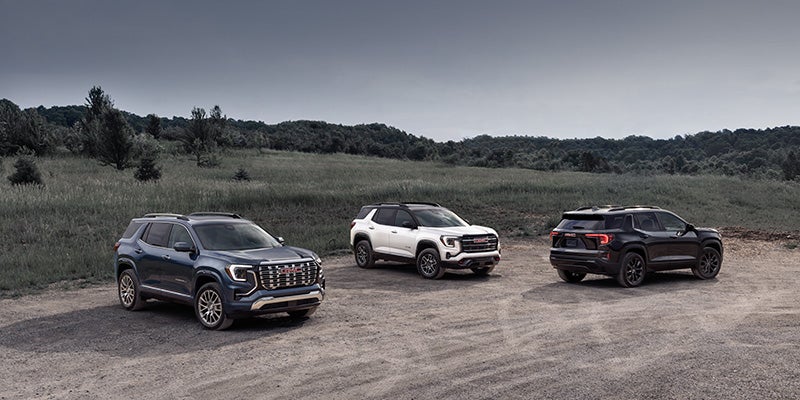
Three GMC SUVs parked on a gravel lot in a grassy field.

The GMC Terrain vs Acadia decision comes down to one structural question: how many passengers does your household carry regularly? Both are GMC crossovers. Both share a family-oriented feature set and the same dealer network. However, the Terrain is a compact two-row SUV and the Acadia is a midsize three-row SUV. That structural difference shapes every other comparison point between them.

Two Different Vehicle Categories

The Terrain and the Acadia are not the same vehicle at different sizes. Instead, they occupy different segments with different design priorities. The Terrain is built around two rows, a compact footprint, and fuel efficiency. The Acadia, by contrast, is built around three rows, a larger cargo floor, and the ability to move more passengers with more gear.

A buyer comparing the two on price alone misses the more important comparison. The Terrain starts at approximately $32,995. The Acadia starts at approximately $42,995. That $10,000 gap reflects a difference in vehicle category, not trim content. As a result, choosing between them based on budget without accounting for seating need creates a mismatch that no feature list resolves.

Seating and Passenger Capacity

The Terrain seats five passengers across two rows. The second row accommodates three passengers with adequate shoulder room for adults on shorter trips. For households that carry no more than five people, the Terrain covers every daily use case without the added length of a third row.

The Acadia seats seven passengers in its standard second-row bench configuration. That bench allows eight passengers, but third-row occupants must climb over a folded seat on trims without captain's chairs. The third row suits passengers under 5'8" on extended trips. Adult passengers in the third row will find legroom limiting after the first hour. For households with three or more children, or for buyers who transport more than five people regularly, the Acadia's third row changes the vehicle's function entirely.

Cargo Space

The Terrain delivers 29.6 cubic feet of cargo space behind the second row. With the second row folded, that number rises to 63.3 cubic feet. The Acadia delivers 15.6 cubic feet behind the third row, 41.7 cubic feet with the third row folded, and 79.2 cubic feet with both rows folded.

The Terrain's cargo number behind the second row is larger than the Acadia's number behind the third row. That gap matters for buyers who load the vehicle with all seats occupied. When the Acadia carries all seven passengers, it provides less usable rear cargo space than a fully loaded Terrain. The Acadia's total cargo advantage only applies when the third row is folded. So for households that use all three rows regularly, the Terrain is the stronger daily cargo vehicle when all seats are in use.

Safety Tech Differences in the Denali Trims

Both the Terrain Denali and the Acadia Denali include GMC's standard advanced driver assistance suite. That shared foundation covers automatic emergency braking, forward collision alert, lane keep assist, lane departure warning, blind zone steering assist, and rear cross-traffic braking. However, the safety tech differences between the two Denali trims go beyond that baseline.

The Acadia Denali adds intersection automatic emergency braking. That system detects cross-traffic threats at intersections where traditional forward collision sensors have limited angles. It also includes a safety alert seat that delivers haptic pulse warnings through the driver's seat cushion. That addition means the driver receives alerts even when audio or visual warnings go unnoticed. Enhanced pedestrian detection and lane keep assist on curves are also part of the Acadia Denali's broader suite.

The Terrain Denali includes HD surround vision, Smart Frequency dampers, and standard AWD. It also covers the full base driver assistance suite in a more compact package. For buyers who want the most comprehensive active safety coverage in either model, the Acadia Denali carries the wider suite. That difference reflects its role as a midsize SUV operating at full occupancy in higher-exposure environments.

Which Model Is Better for Towing

The Terrain tows up to 1,500 pounds across every trim. That rating covers small utility loads. It does not support boats, camper trailers, or travel trailers of substantial size. The Acadia, on the other hand, tows up to 5,000 pounds across every trim with the trailering package confirmed across all configurations.

That 3,500-pound difference defines the towing conversation entirely. A buyer who needs to tow a personal watercraft, a small camper, or a utility trailer above 1,500 pounds has one option in this comparison. The Acadia's 2.5L turbo handles heavier structures and maintains highway passing power under load. The Terrain does not offer a towing upgrade path that closes that gap. Therefore, for towing, the Acadia is the only applicable choice between the two.

Which Model Is Better for Long Road Trips

For long road trips with more than five passengers, the Acadia is the stronger choice. The larger infotainment screen, additional powertrain reserve under highway load, and extra row all contribute to a less fatiguing long-distance drive. Families with children in a third row also benefit from the physical separation that the additional row creates on multi-hour trips.

The Terrain, however, is the stronger road trip vehicle for households of four or fewer. Its fuel efficiency advantage — up to 27 MPG highway versus the Acadia's 25 MPG highway — extends the range between fuel stops. The shorter wheelbase also makes city navigation and parking at destinations more manageable. For a two-adult, two-child household covering 400 miles, the Terrain handles the trip without giving up anything the Acadia provides for that passenger count.

Recommended Posts

Is Synthetic Oil Worth It? Blend vs. Full Synthetic Explained

Is Synthetic Oil Worth It? Blend vs. Full Synthetic Explained

Is Synthetic Oil Worth It? Blend vs. Full Synthetic Explained For most newer vehicles, yes. Synthetic oil is worth it, and many newer engines call for it. If you commute on I-10 or sit in traffic on Airline Highway, your oil sees plenty of heat and stop-and-go driving. Here's what our Gonzales service team wants you to know. Synthetic blend vs. full synthetic A synthetic blend mixes synthetic and conventional base oils. It offers some of the benefits of full synthetic. Full synthetic generally holds up best under heat and hard driving. The right choice is whatever your owner's manual calls for. If your engine requires full synthetic, a blend may not meet the specification. Why synthetic oil is worth it It holds up in high heat. Synthetic oil resists breaking down when your engine runs hot, which matters in south Louisiana summers. It flows easily at startup. It helps protect engine parts in the first few seconds after you start the car. It helps most under hard use. Towing, stop-and-go traffic and turbocharged engines all make your oil work harder. What to do Check your owner's manual for the oil viscosity and specification your engine calls for. Follow your oil life monitor if your vehicle has one, and don't go past it. Ask our service team if you're not sure which oil is right for your vehicle. Frequently asked questions Is a synthetic blend good enough? It depends on your engine. If your owner's manual allows it, a blend that meets the listed specification is fine. If your manual calls for full synthetic, use full synthetic. Does stop-and-go traffic affect my oil? Yes. Heavy traffic, short trips and heat all make your oil work harder. Follow your oil life monitor, and check your manual for a severe-service schedule. Can I use synthetic oil in an older vehicle? In many cases, yes, as long as the oil meets the viscosity and specification in your owner's manual. If you're not sure, ask our service team. Can I switch between conventional and synthetic oil? Generally yes, as long as the oil meets your owner's manual specification. Mixing oils that meet the specification generally won't harm your engine, but you'll get the most benefit from the type your manual recommends. Time for an oil change? Ross Downing GMC Gonzales · 2522 S. Burnside Ave., Gonzales, LA 70737 Schedule Service Or call (225) 621-2164 This article is general information. Always follow your owner's manual and your technician's recommendations for your specific vehicle.

GMC Maintenance Schedule for Hurricane Season Prep

GMC Maintenance Schedule for Hurricane Season Prep

A GMC maintenance schedule can give Louisiana drivers a useful starting point before hurricane travel or evacuation becomes necessary. Storm preparation should begin before rain, traffic, and urgent departure plans arrive. Therefore, checking key service items early can reduce surprises when your truck or SUV needs to leave quickly. Battery health, tire tread, brakes, wipers, fluids, and fuel all deserve attention before severe weather moves closer. Check the Battery Before Storm Travel Your battery deserves an early check because evacuation plans can depend on one clean start. However, a truck may start normally today while still carrying a weak battery. Therefore, a proper test offers more information than a quick visual check alone. Inspect the battery case, terminals, and nearby cables before storm season. Look for corrosion, loose connections, cracks, or signs of leakage. Additionally, ask for a battery test if the battery is older or has shown slow cranking. Heat can also shorten battery life, which matters during Louisiana summers. Before a storm, review these battery and electrical items: Check the battery terminals for corrosion and secure connections. Ask for battery testing if starting has become slower or less consistent. Confirm that charging cables, phone chargers, and portable power banks are ready. A battery check supports more than starting the engine. It also supports lights, charging, and other electrical needs during a long trip. Therefore, completing the check before evacuation traffic begins gives you more time to correct a problem. Inspect Tires, Brakes, and Wipers for Heavy Rain Wet roads place extra attention on traction, stopping, and visibility. Tire pressure alone does not tell the whole story. Additionally, tread depth, uneven wear, sidewall damage, and age should be reviewed before storm travel. Start by checking all four tires when they are cold. Compare the pressure with the specification listed for your GMC. Additionally, inspect tread across the full width of each tire. Uneven wear may point to another service need that deserves attention before a long drive. Brakes deserve the same review. Listen for grinding, squealing, or other unusual sounds during normal stops. However, sound alone does not confirm brake health. A service inspection can check pads, rotors, fluid, and related parts. Wiper blades are just as important during intense rain. Replace blades that streak, skip, chatter, or leave large areas uncleared. In addition, fill the washer reservoir and test the spray pattern before you leave. These checks matter because heavy rain can reduce how much time you have to react. Therefore, good tread, clear glass, and responsive brakes support safer travel. Prepare for a Longer Evacuation Drive A GMC maintenance schedule should also guide the service items that may already be due. An evacuation can add hours of driving in heat and traffic. Therefore, overdue maintenance deserves attention before a storm is close. Check the oil life reading and compare current mileage with the service schedule. Additionally, review coolant, brake fluid, and other listed fluids for your model. Your Owner's Manual gives the correct schedule and specifications for your GMC. Fuel planning also matters. Do not wait until evacuation traffic begins to think about filling the tank. Instead, keep enough fuel available to leave without an immediate stop. Gas stations may become crowded, and some may lose power during severe weather. Before leaving, review these final travel items: Confirm oil life, fluid levels, fuel, tire pressure, and washer fluid. Pack charging cables, water, food, medication, flashlights, and a first aid kit. Save your primary route and an alternate route before cellular service becomes limited. In addition, keep registration, insurance information, and emergency contacts easy to reach. A little preparation can shorten the list of decisions you must make later. Build a GMC Hurricane Kit for the Road A hurricane kit inside your truck or SUV should focus on time spent away from home. The goal is to cover basic needs during traffic, delays, or a longer evacuation route. Water and nonperishable food should be easy to reach. Additionally, keep needed medication in a secure place that stays with you. Flashlights, charging cords, portable battery packs, and a basic first aid kit can support travel when power is limited. In addition, children, older relatives, and pets can each add specific needs. Therefore, pack those supplies before a watch or warning creates a rush. Keep the kit organized so important items are easy to find. Avoid burying medication or charging gear under luggage. Moreover, secure heavier objects so they do not move through the cabin during a sudden stop. Never Treat Floodwater as a Truck Test Can a GMC truck or SUV drive through floodwater? No truck or SUV should be used to test whether a flooded road is safe. Moving water can push a large pickup away, and standing water can hide severe road damage. A taller ride height does not make an unknown flooded road safe. Water can cover washed out pavement, debris, sharp objects, or missing road edges. Therefore, turning around is the safer choice when water covers the roadway. If flooding blocks your planned route, use official flood safety guidance and choose another path. Do not follow another driver into the water as proof that crossing is safe. In addition, never drive around barricades placed across flooded roads. Storm preparation works best before the forecast creates urgency. Review your GMC maintenance schedule, inspect key service items, and pack your supplies early. Then, keep fuel available and know where you will go if evacuation becomes necessary. Ross Downing GMC of Gonzales can also inspect your GMC before hurricane travel. Early preparation gives you more options when the weather changes quickly.

GMC Commercial Fleet Incentives for Sierra Businesses

GMC Commercial Fleet Incentives for Sierra Businesses

GMC commercial fleet incentives can lower certain vehicle or equipment costs when a qualifying business adds a Sierra. The first step is not choosing an offer. It is defining the work the truck must handle. Towing needs, payload, daily mileage, cab size, and employee use all shape the purchase. In addition, the business should review financing, tax questions, and service needs before signing. Start With the Work Your Sierra Needs to Do A work truck should match the tasks it will handle each day. That starts with the load, trailer, passengers, tools, and miles involved. A landscaping company may need bed space and towing hardware. A contractor may care more about cab space, tool storage, and jobsite access. A sales or service team may spend more time on highways and customer visits. Before choosing a Sierra trim, define the core work: List the trailer weights, payload needs, tools, and cargo the truck must carry. Confirm how many employees will ride in the truck and how much cab space they need. Estimate annual mileage, jobsite travel, highway travel, and time spent behind the wheel. These details create a clear starting point. Therefore, the truck can be matched to actual work instead of trim names alone. In addition, this approach makes later financing and incentive discussions easier because the business already knows what it needs. Which GMC Sierra Trim Fits a Small Business? The right Sierra trim depends on the truck's workload, employee use, towing needs, and equipment requirements. GMC offers several Sierra 1500 trims that can serve different business roles. Pro, SLE, Elevation, and SLT each add different cabin, technology, and powertrain content. Sierra Pro keeps the focus on core truck hardware and straightforward equipment. That can make sense for a business that needs a work focused pickup without many added cabin features. SLE adds more interior technology and comfort content. Therefore, it can fit employees who spend more hours driving between jobs. Elevation adds a more distinctive exterior look along with added cabin content. That can suit a business truck that also appears at customer appointments or public facing work. SLT adds more standard equipment and a V8 powertrain in many configurations. In addition, its cabin can fit owners or employees who spend long days on the road. The strongest trim choice comes from the job itself. A business should compare payload, towing, cab size, bed length, drivetrain, and included equipment. Then, it can decide whether added cabin content is worth the added cost. What Fleet Incentives Can a Small Business Use? Available incentives depend on fleet eligibility, vehicle qualification, program rules, and the specific purchase or upfit. GM Fleet uses a Fleet Account Number for access to several fleet programs. Therefore, a business should verify eligibility before assuming a listed offer applies. Business Choice can also support certain work related purchases. Current GM Fleet materials show accessory or upfit allowances on qualifying vehicles. For some Sierra light duty trucks, that money can be applied toward eligible equipment tied to the truck's job. Before using an offer, verify these items: Confirm whether the business qualifies for a Fleet Account Number and whether the vehicle qualifies for the program. Review the exact allowance amount, eligible accessories, approved upfits, and program dates. Ask whether the offer can be combined with other fleet or retail incentives on the same transaction. This matters because a work truck may need more than the truck itself. Bed protection, steps, storage, towing hardware, or another approved upfit can add to the total purchase cost. Therefore, an accessory or upfit allowance may support a specific work need. Compare Commercial Financing and Leasing Paths A business can fund a Sierra in more than one way. GM Financial offers commercial financing, leasing, and fleet credit options for qualifying customers. Each path changes cash flow, vehicle ownership, and how easily a business can add more trucks later. Traditional financing spreads the purchase over a set term. At the end, the business owns the truck once the balance is paid. Leasing follows a different structure. The business makes payments for the agreed term and follows the mileage and return terms in the contract. Fleet credit can support companies that expect to add several vehicles. A qualifying business may use one credit line for multiple fleet purchases or leases. Therefore, the structure can simplify borrowing as the number of vehicles grows. Before choosing a funding path, review: How much cash the business wants to keep available after the purchase. How many miles the truck is likely to travel each year. Whether the business expects to keep the Sierra for many years or replace it on a set cycle. The financing choice should match the company's cash plan and vehicle plan. In addition, the business should review fees, mileage terms, interest costs, and contract details before signing. Review Tax and Ownership Costs Before You Buy Federal tax rules can change the math for a business vehicle. GMC currently lists qualifying Sierra configurations under Section 179 and bonus depreciation guidance. However, the exact treatment depends on the truck configuration and the business's tax situation. Bed length and vehicle weight can matter. In addition, business use percentage and placed in service timing can matter. A Sierra 1500 Standard Bed or Long Bed may fall under different Section 179 treatment than a Short Bed configuration. Therefore, a tax professional should review the exact vehicle before the business relies on a deduction. Before purchase, the business should also review: The exact VIN, bed configuration, and vehicle weight data tied to the truck. The expected business use percentage and the date the truck will enter service. The maintenance, fuel, insurance, registration, and replacement costs that will continue after purchase. Tax savings should never be assumed from the model name alone. Instead, the business should verify the truck and the rules with a qualified tax professional. A Sierra can serve as a single company truck or the first vehicle in a growing fleet. Therefore, the purchase should connect the truck, financing structure, available incentives, and future operating costs. Ross Downing GMC of Gonzales can review current Sierra inventory and available commercial programs with local business owners. With the right information in hand, a company can choose a truck that fits the work. It can also keep the purchase within its planned budget.